Updating or Removing My Name, Email or Number Listed in the PetDesk Pet Portal App
There’s one thing more important than anything else to ensure you’re receiving all your pet’s health service notifications and appointment reminders: the seamless syncing of the records we have on file for you to your app. To guarantee a seamless sync, your email address on file with us must match the email address in your pet portal. If you would like to update or change your email address, please contact us with that change AND follow the steps below.
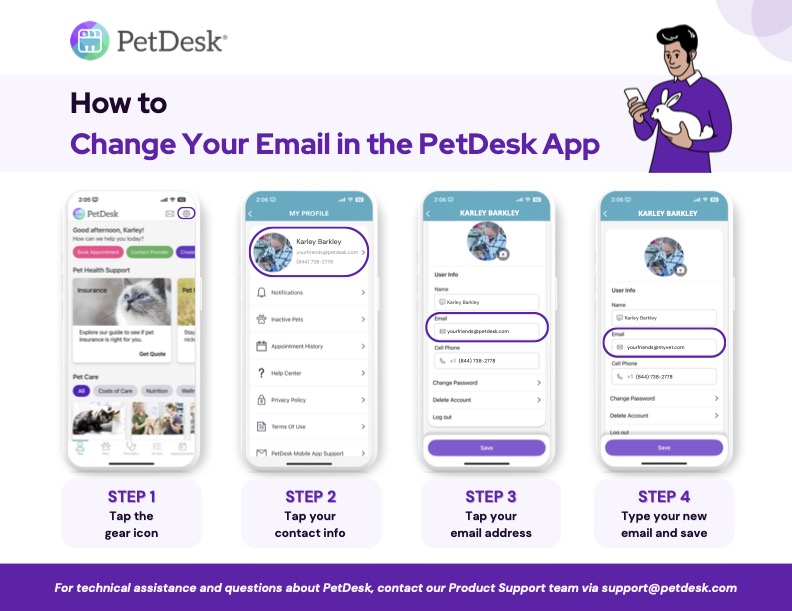
- On the top banner, tap the settings/gear icon
- Tap on the box located at the top of the screen (lists your name, email, number)
- Tap your info and edit as needed > tap the “Update” or “Save” buttonSuccess! You’ve updated your info in the app.
Be sure to confirm that we have the correct information on file as well. As always, never hesitate to contact us with any questions or concerns. We are here for you!

Cookies on this website are used to both support the function and performance of the site, and also for marketing purposes, including personalizing content and tailoring advertising to your interests. To manage marketing cookies on this website, please select the button that indicates your preferences. More information can be found in our privacy policy here.